Credit reservation window setting
Minor Update
With this release, the Credit Reservation Window is configurable through a new AppSetting. The Credit Reservation Window defines how far into the future the system looks when calculating credit limit utilization for upcoming scheduled changes.
Previously, the credit limit check considered all upcoming scheduled changes. With this enhancement, the system only evaluates due amounts within the configured number of days and ignores scheduled changes beyond that window.
The Credit Reservation Window setting is available as a dropdown with the following pre-configured options:
- 30 days (default)
- 60 days
- 90 days
- Custom — accepts any value up to 999 days
Key highlights
- You can configure how many days of upcoming scheduled changes are included in credit limit calculations.
- Long-term future commitments no longer inflate current credit limit utilization, giving customers a more accurate view of available credit today.
- The default Credit Reservation Window is 30 days, with support for custom values up to 999 days.
UI updates
This release introduces a new Credit Reservation Window setting under Purchase restrictions.
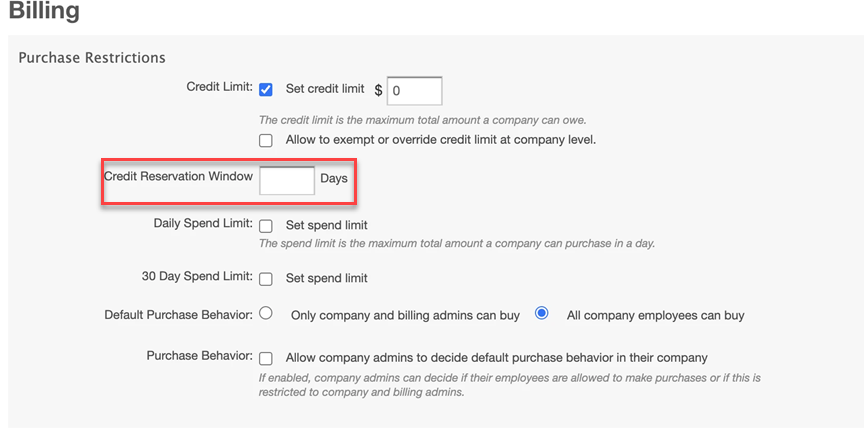
📝 Note:
- If no value is configured, the system applies the default of 30 days.
- Only scheduled changes with due dates falling within the Credit Reservation Window are included in credit limit utilization calculations.
Feature enablement
This feature is not enabled by default. Contact your AppDirect technical representative to request it.
Setting enablement
Credit limit must be enabled (Settings > Billing Functionality > Purchase Restrictions > Credit limit).
Documentation
Documentation will be updated with the release.
Was this page helpful?
Tell us more…
Help us improve our content. Responses are anonymous.
Thanks
We appreciate your feedback!